

With more than 700 weekly active users giving more than 2.5+ billions prompts each day, ChatGPT is one of most popular and advanced AI engines in the world right now.
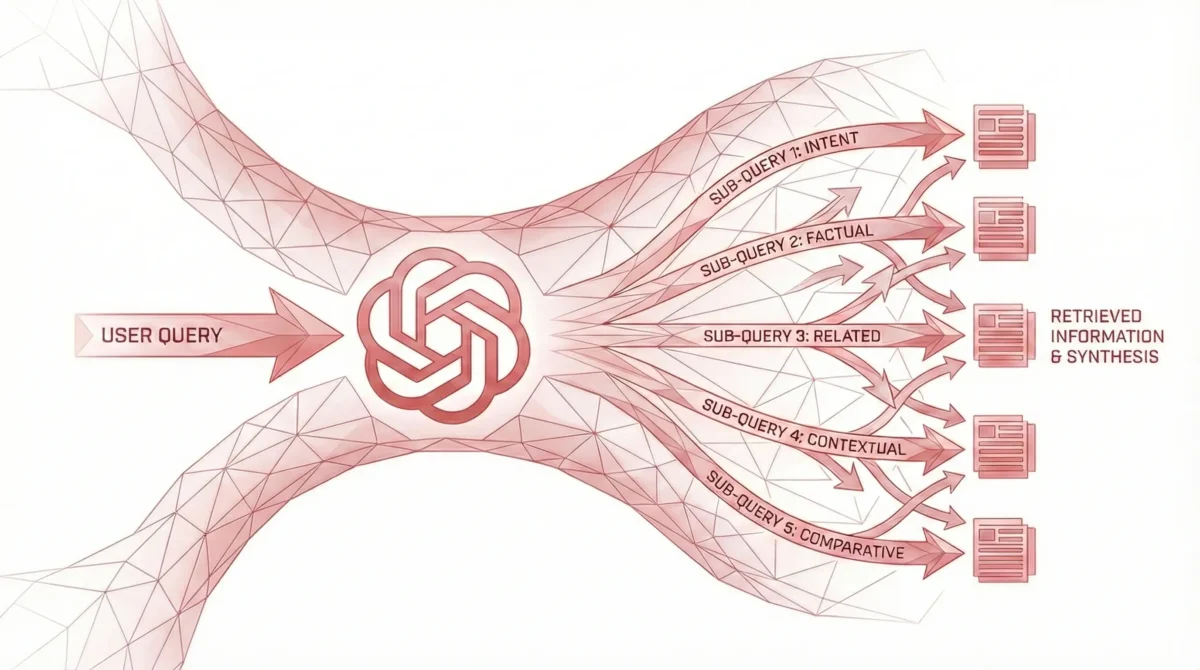
But, do you know that each prompt or query you send to ChatGPT is broken into multiple other similiar queries before presenting you the answer?
Yes, and this process is called “Query Fan-Out”.
In the world or AI people right now, query fan-out is quite a popular topic.
So, when you send a prompt to ChatGPT or any other AI engines, the engine first break your prompt into multiple other semantic keywords and then send these keywords to the database from when it is extracting the information.
After sending these multiple keywords to the database, the database then send their most favourable result to the AI engine for that particular keyword. And, then finally we see the answer based on these results.
Let’s take an example to understand this.
So, when we send a prompt to ChatGPT, it first breaks the prompt into multiple semantic keywords and then retrieve the most favourable information from Bing.
Here, ChatGPT is the AI engine where Bing is its Database.
Similiarly, Google AI overviews and Google AI mode has Google Search as there database.
Now, Suppose we are writing an Article about “The Best AI Tools for SEO in 2026″ and we want this article to be featured inside ChatGPT. So, what would be the best approach in terms of Optimization?
I believe what we can do is Searching this exact title inside ChatGPT and then find out the Fan-Out queries and then write a detailed article fulfilling the intent of these queries as well. So, Don’t you believe, this way our chances of getting featured inside ChatGPT is higher?
But the real question is, how can you identify these Fan-Out Queries?
Let me show you the same.
Steps to Identifying ChatGPT Fan-Out Queries
- Search the exact title regarding which you are creating the webpage inside ChatGPT.
- Let ChatGPT to complete giving you the answer.
- Once, the process is finished, copy the last slug of the Chat URL.
- Then, Go to Inspect > Network > Last Slug > Response and then inside the response section search for search_queries. Then, whatever queries are present inside it are the Fan-Out Queries.
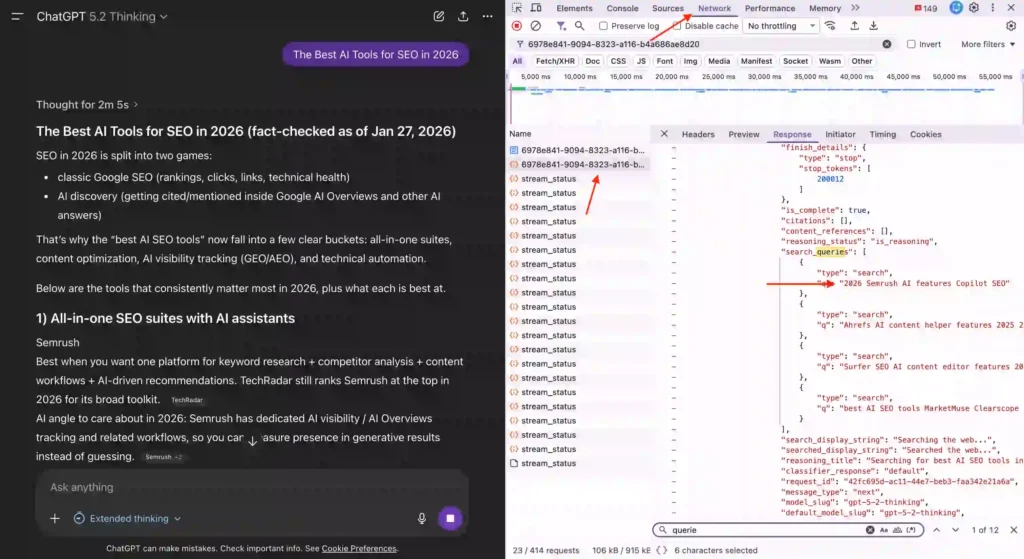
You can count these Fan-Out Queries as the Goldmine keywords to rank inside ChatGPT for the particular title you searched earlier.
However, this process is complicated to identify these Fan-Out Queries on regular basis. Hence, I made a plugin called Prism that you can use in your Chrome Browser or Microsoft Edge browser to automatically captures these Fan-out keywords.
So, Fan-out queries are the goldmine in the AI industry right now to rank inside the respective AI engines.
Let me know your thoughts about the same in the comments down below.
